Phishing attacks are no longer just about fake emails.
Today’s attackers impersonate entire brands using lookalike domains and weak email security settings.
This research analyses real-world results from people using Bluefire Redteam’s online security tools to check their own domains.
The findings are clear:
most organisations are far more exposed than they realise.
What Is Domain Impersonation?
Domain impersonation happens when attackers register lookalike domains that closely resemble a real company’s website.
Common examples include:
- Typos (example:
paypa1.com) - Extra words (
login,secure,mail) - Similar-looking letters (homoglyph attacks)
These domains are used to:
- Steal login credentials
- Send phishing emails
- Trick customers and employees
- Commit business email compromise (BEC)
Key Finding #1: Lookalike Domains Are Everywhere
🔴 85% of scanned domains had active lookalike domains
This means that for most companies:
- Attackers already own domains that look like their brand
- These domains can be used for phishing or fraud
- The real organisation is often unaware

Figure 1: Percentage of Domains With Lookalike Domains
Why Lookalike Domains Are So Dangerous
Lookalike domains:
- Sit outside your website and firewall
- Bypass traditional security tools
- Exploit human trust instead of software bugs
Even companies with strong cybersecurity programs are affected, because brand impersonation happens outside the network.
What Is Email Spoofing?
Email spoofing is when attackers send emails that appear to come from your domain, even though you didn’t send them.
This is usually caused by:
- Missing SPF records
- Weak DMARC policies
- Misconfigured email authentication
Attackers use spoofed emails to:
- Send fake invoices
- Impersonate executives
- Run phishing campaigns
- Trick staff into transferring money
Key Finding #2: Most Domains Can Still Be Spoofed
🟠 77% of scanned domains were either easily spoofable or only partly protected
Only a small number had strong email security in place.
| Email Security Status | Percentage |
|---|---|
| Easily spoofable | 40% |
| Somewhat protected | 37% |
| Well protected | 23% |
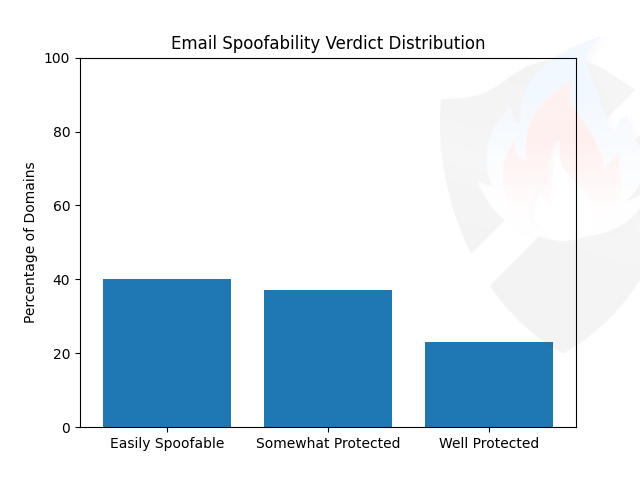
Figure 2: Email Spoofing Risk Levels
DMARC, SPF, and Why “Somewhat Protected” Isn’t Enough
Many organisations believe they are safe because they have DMARC enabled.
However:
- DMARC set to
noneorquarantinestill allows attacks - Relaxed alignment weakens protection
- Subdomains are often forgotten
🔑 Only 15% of domains fully blocked spoofing using DMARC reject
📊 Chart Placeholder
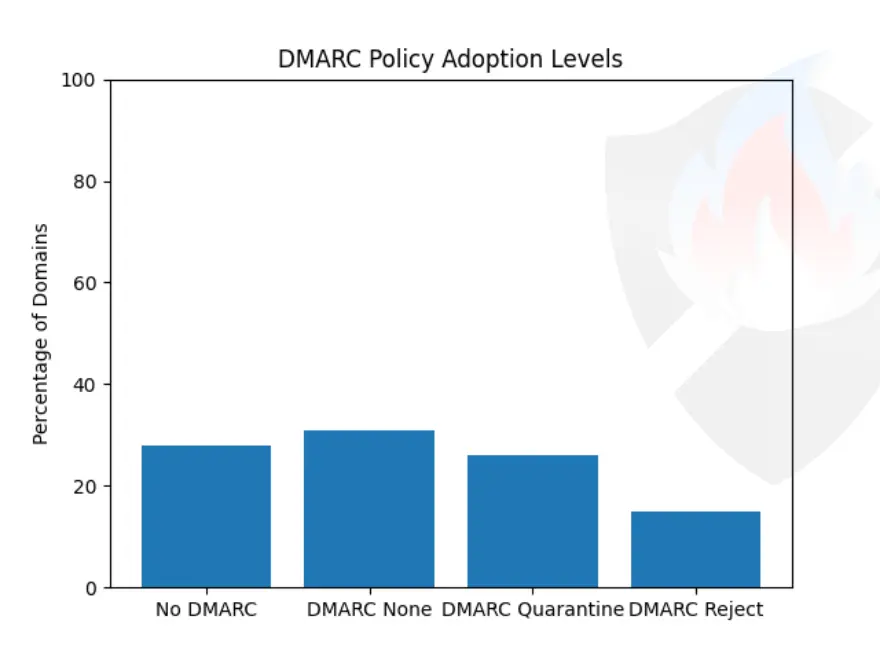
Figure 3: DMARC Policy Adoption
Key Finding #3: Missing SPF Is Still Common
SPF tells email servers which systems are allowed to send email for your domain.
Yet:
- 46% of domains had no valid SPF
- 21% had weak or misaligned SPF
- Some domains could receive email without protection
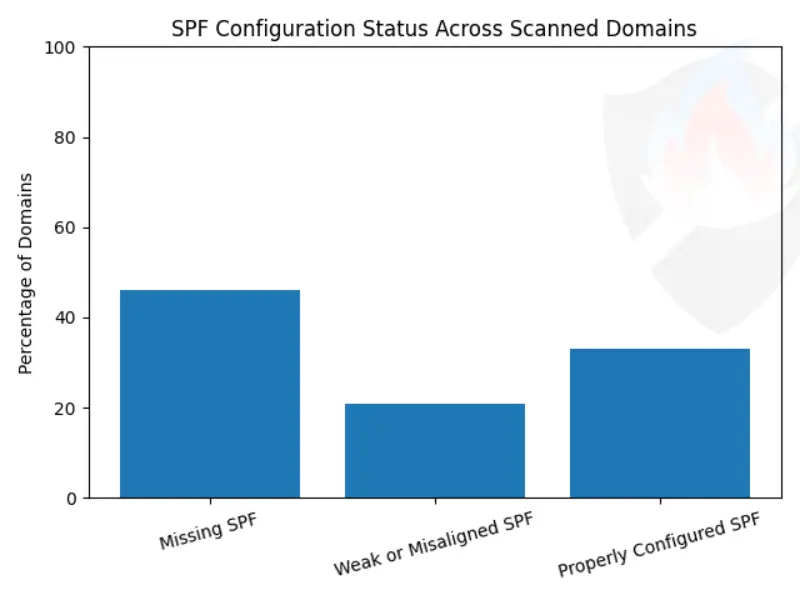
Figure 4: SPF and Email Configuration Issues
Key Finding #4: Email Transport Security Is Rare
Advanced protections like MTA-STS and TLS-RPT help prevent email interception.
Despite this:
- Only 14% used MTA-STS
- Only 9% used TLS-RPT
- 77% used neither
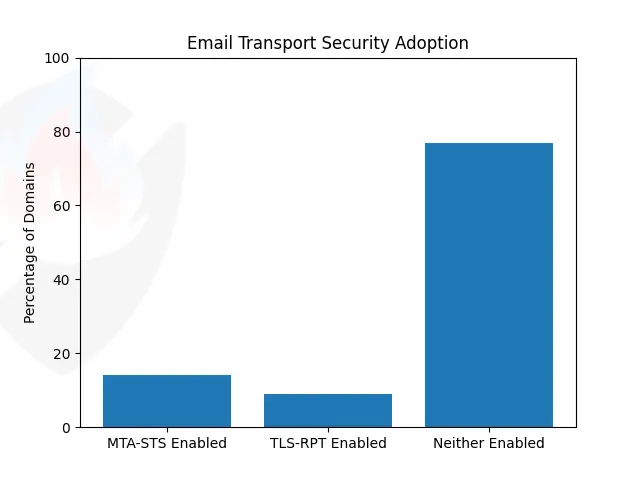
Figure 5: Email Transport Security Adoption
The Most Dangerous Scenario (Attackers Love This)
🔥 62% of domains had BOTH:
- Lookalike domains
- Weak email security
This combination allows attackers to:
- Send emails that look real
- Use fake domains that match the brand
- Trick users with almost no effort
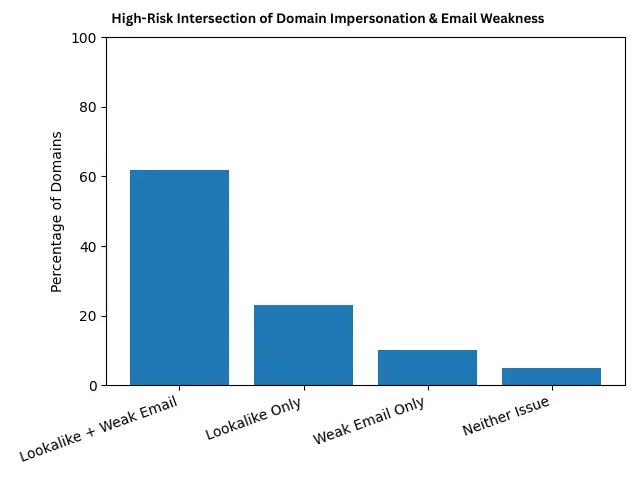
Figure 6: Overlapping Risk – Lookalike Domains + Email Spoofing
Why Bluefire Red Team Built These Tools
These tools were built after seeing the same issues repeatedly during real red team and phishing assessments.
They allow anyone to:
- Check if their domain can be spoofed. Check Now
- Discover lookalike domains targeting their brand. Check Now
- See what attackers see first
No hacking.
No exploitation.
Just visibility.
How to Protect Your Domain (Quick Checklist)
If you manage a domain, you should:
- Set DMARC to
reject - Configure SPF correctly
- Lock down subdomains
- Monitor lookalike domain registrations
- Enable MTA-STS and TLS reporting
These steps alone can stop a huge percentage of phishing attacks.
Final Takeaway
Phishing doesn’t start with malware.
It starts with domains and trust.
This report shows that domain impersonation and email spoofing are still among the easiest ways to attack organisations worldwide.
If you haven’t tested your domain yet, attackers already have.